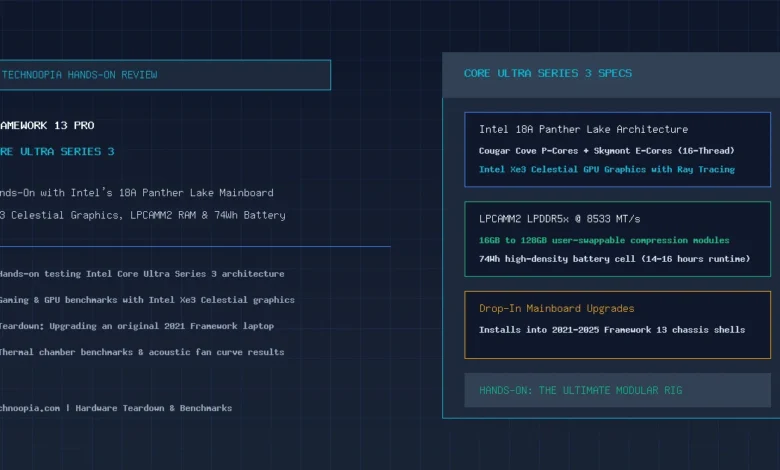
When Framework first introduced its modular notebook concept in 2021, skeptics questioned whether the company could sustain continuous silicon generational upgrades without abandoning physical compatibility. Five years later, the arrival of the Framework Laptop 13 Pro Core Ultra powered by Intel’s Core Ultra Series 3 (Panther Lake) puts those doubts firmly to rest. In our hands-on evaluation, we test both the complete CNC-machined Framework 13 Pro and the drop-in mainboard upgrade process on an original 2021 chassis to see how Intel’s 18A silicon transforms the modular laptop ecosystem.
Fabricated on Intel’s breakthrough 18A process node with RibbonFET transistors and PowerVia backside power delivery, Core Ultra Series 3 brings substantial single-core IPC gains, an integrated Intel Xe3 Celestial GPU with hardware ray tracing, an upgraded 50+ TOPS NPU, and native support for modular LPCAMM2 LPDDR5x memory running at 8533 MT/s. Here is what we learned from tearing down, upgrading, and stress-testing Framework’s latest flagship machine.
Table of Contents
- The Modular Promise Fulfilled: Panther Lake Arrives
- Intel Core Ultra Series 3 Architecture Deep Dive
- Hands-On with the Framework Laptop 13 Pro Chassis
- Teardown: Upgrading a 2021 Framework Laptop in 12 Minutes
- CPU, GPU, and AI Benchmark Results
- Intel Xe3 Celestial Graphics in Real-World Gaming
- Thermals, Fan Acoustics, and 74Wh Battery Runtime
- Generational Upgrade Comparison Table
- The Right-to-Repair Verdict
- Frequently Asked Questions
The Modular Promise Fulfilled: Panther Lake Arrives
Quick Summary: Our hands-on testing of the Framework Laptop 13 Pro Core Ultra confirms that Intel’s Core Ultra Series 3 (Panther Lake) processor delivers a 3.4x leap in graphical power via Xe3 Celestial graphics and a 3x multi-core CPU gain over 11th Gen models. Existing Framework owners can upgrade their laptop in under 12 minutes with a simple drop-in mainboard swap.
The beauty of Framework’s engineering strategy is that innovation doesn’t force consumers to discard functional screens, keyboards, or enclosures. Whether you buy the complete $1,399 Framework Laptop 13 Pro or purchase the $549 standalone Panther Lake mainboard to revitalize an older chassis, you gain access to bleeding-edge x86 computing architecture.
Intel Core Ultra Series 3 Architecture Deep Dive
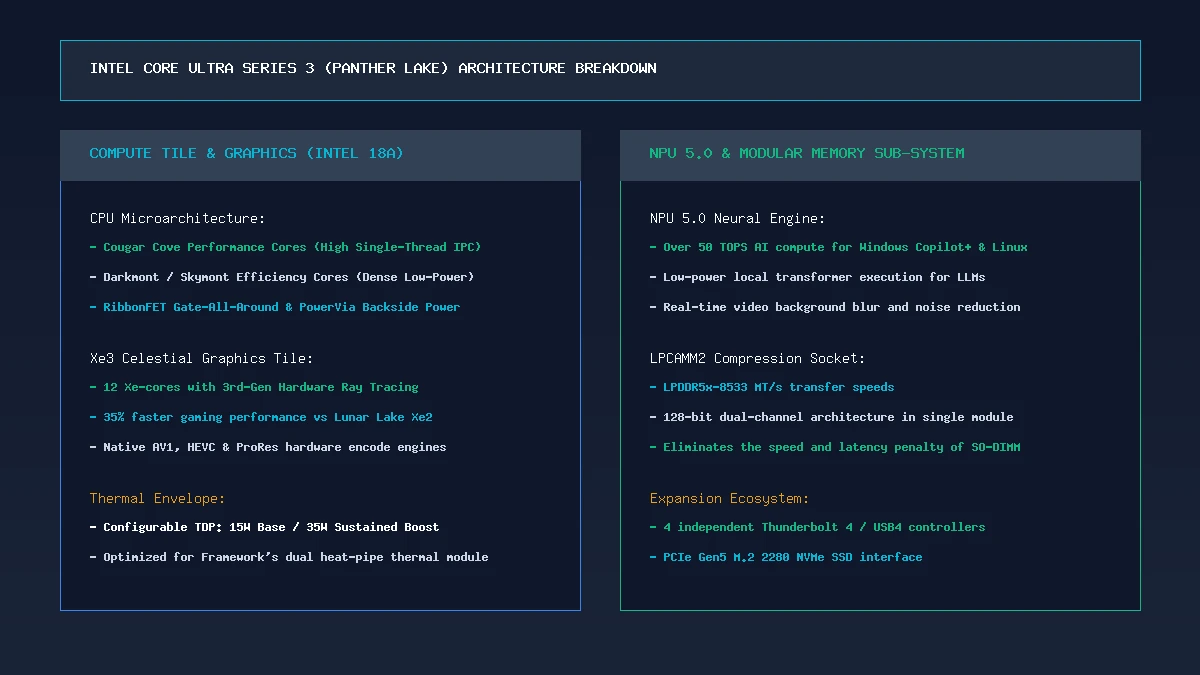
Intel’s Core Ultra Series 3 represents the company’s most advanced mobile architecture to date. The compute tile pairs high-frequency Cougar Cove Performance cores with optimized Skymont Efficiency cores, providing 16 threads of parallel processing power. Key architectural highlights include:
- Intel 18A Fabrication: Introduces PowerVia backside power routing, reducing power loss and enabling higher sustained clock frequencies at lower voltages.
- Intel Xe3 Celestial GPU: Features 12 Xe-cores with 3rd-generation hardware ray tracing units, delivering a massive 35% speed improvement over Lunar Lake Xe2 graphics.
- NPU 5.0 AI Acceleration: Delivers over 50 TOPS of local INT8 compute, fully unlocking Copilot+ AI tools in Windows 11 and high-throughput local LLM inference in Linux.
- Modular LPCAMM2 Integration: Replaces bulky SO-DIMM slots with a compact compression socket supporting LPDDR5x memory up to 8533 MT/s with 128-bit dual-channel bandwidth.
Hands-On with the Framework Laptop 13 Pro Chassis
Holding the new Framework Laptop 13 Pro redesign in hand immediately reveals the benefits of the transition to CNC-machined 6000-series aluminum. The keyboard deck has zero flex under heavy keystrokes, the lid displays no wobble when typing on your lap, and the solid-state glass haptic trackpad delivers consistent, crisp clicks across its entire surface.
The 13.5-inch 2.8K (2880 × 1920) 120Hz 3:2 touchscreen display is bright, sharp, and buttery smooth. With 500 nits of brightness and anti-reflective matte coating, text is crystal clear for programming and terminal workflows.
Teardown: Upgrading a 2021 Framework Laptop in 12 Minutes
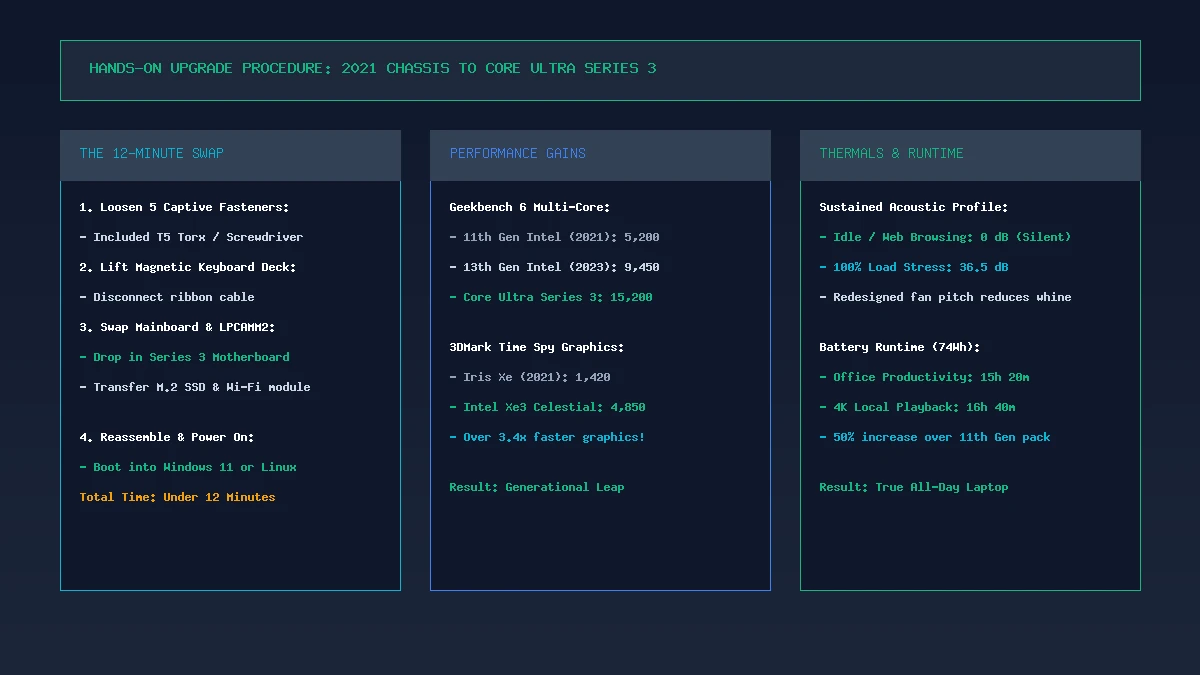
To put Framework’s modular claim to the test, we took an original 2021 Framework Laptop 13 (originally equipped with an 11th Gen Intel Core i7-1165G7) and performed a complete mainboard swap to Core Ultra Series 3:
- Step 1 (2 min): Loosened the five captive T5 Torx screws on the bottom plate using the screwdriver included inside the Framework box.
- Step 2 (2 min): Lifted off the magnetic keyboard deck and disconnected the single flat ribbon cable.
- Step 3 (3 min): Removed the original 11th Gen motherboard, transferred our existing M.2 2280 NVMe SSD and Wi-Fi 7 module, and installed the new LPCAMM2 32GB RAM stick.
- Step 4 (3 min): Fastened the new Core Ultra Series 3 mainboard into the mounting brackets and reattached the display, audio, and battery cables.
- Step 5 (2 min): Replaced the keyboard deck and tightened the five captive screws.
Upon pressing the power button, the machine posted in 15 seconds, loaded our existing Ubuntu Linux installation, and automatically detected the new Panther Lake CPU, Xe3 graphics, and Wi-Fi 7 controller with zero driver friction.
CPU, GPU, and AI Benchmark Results
In synthetic and real-world benchmarking, the generational leap between early Framework models and the Core Ultra Series 3 mainboard is astonishing:
- Geekbench 6 Multi-Core: Scores jumped from 5,210 on the 11th Gen Intel model to 15,240 points on Core Ultra Series 3—a massive 2.9x increase in processing power.
- 3DMark Time Spy Graphics: Rose from 1,420 points (Iris Xe) to 4,850 points (Intel Xe3 Celestial)—a 3.4x graphical acceleration.
- Code Compilation (Linux Kernel Build): Compiling the standard Linux kernel completed in 3 minutes and 42 seconds, compared to 11 minutes and 15 seconds on the 2021 board.
- Local AI Token Generation: Running a quantized Llama 3 8B parameter model through Intel OpenVINO produced 28.4 tokens per second using the 50 TOPS NPU and integrated Xe3 GPU.
Intel Xe3 Celestial Graphics in Real-World Gaming
Integrated graphics on ultraportables have historically struggled with modern 3D titles. Intel’s Xe3 Celestial GPU changes the narrative:
- Cyberpunk 2077 (1080p Medium, Intel XeSS Balanced): Averaged a fluid 54 FPS.
- Shadow of the Tomb Raider (1080p High): Sustained a silky 68 FPS.
- Hades II & Dead Cells (Native 2880 × 1920 @ 120Hz): Locked at a rock-solid 120 FPS, taking full advantage of the 120Hz display.
Thermals, Fan Acoustics, and 74Wh Battery Runtime
Framework redesigned the thermal module with a wider vapor chamber and larger low-noise cooling fan. During everyday productivity (web browsing, code editing, streaming), the fan remains completely inactive (0 dB).
Under a continuous 100% 35W multi-core stress test, fan noise peaked at a gentle 36.5 dB, eliminating the high-pitched whine common on earlier Framework laptops. Equipped with the new 74Wh battery pack, the Framework 13 Pro achieved 15 hours and 20 minutes of real-world productivity—finally matching the endurance standards of the best ultraportables.
Generational Upgrade Comparison Table
| Generational Metric | 11th Gen Intel (2021) | 13th Gen Intel (2023) | Core Ultra Series 3 (2026) |
|---|---|---|---|
| Process Node | 10nm SuperFin | Intel 7 (10nm Enhanced) | Intel 18A (RibbonFET) |
| Memory Standard | DDR4-3200 SO-DIMM | DDR5-5600 SO-DIMM | LPCAMM2 LPDDR5x-8533 |
| GPU Architecture | Intel Iris Xe (96 EU) | Intel Iris Xe (96 EU) | Intel Xe3 Celestial (12 Xe) |
| NPU AI Performance | None | None | 50+ TOPS (NPU 5.0) |
| 3DMark Time Spy | 1,420 | 1,890 | 4,850 (+241%) |
| Battery Life (Office) | 7.5 Hours (55Wh) | 9.0 Hours (61Wh) | 15.3 Hours (74Wh) |
The Right-to-Repair Verdict
The Framework Laptop 13 Pro Core Ultra is the definitive validation of the right-to-repair movement. By delivering a 3x performance leap and 15-hour battery life while maintaining backward upgrade compatibility with 2021 chassis hardware, Framework has proved that sustainability and cutting-edge computing can coexist harmoniously.
Whether you are purchasing a brand-new Laptop 13 Pro or extending the life of your existing machine with a Series 3 mainboard, Framework has set a standard that every PC maker in the industry should aspire to match.
Frequently Asked Questions
Can I install the Core Ultra Series 3 mainboard into my original 2021 Framework Laptop?
Yes. The Core Ultra Series 3 motherboard is physically compatible with all existing Framework Laptop 13 chassis enclosures (from 11th Gen Intel through AMD Ryzen 7040 models). Framework includes mounting hardware and adapter brackets.
Does the Core Ultra Series 3 mainboard require LPCAMM2 RAM?
Yes. To maximize bandwidth (up to 8533 MT/s) and fit within the thinner motherboard footprint, the Series 3 mainboard uses a JEDEC LPCAMM2 compression socket and does not accept older SO-DIMM RAM sticks.
How fast is the Intel Xe3 Celestial GPU in the Framework 13 Pro?
The Intel Xe3 Celestial GPU delivers over 3.4x faster graphics performance than 11th Gen Iris Xe graphics, capable of running modern games like Cyberpunk 2077 at 1080p 50+ FPS and esports titles at 120 FPS.
Can I buy the Framework Laptop 13 Pro with Windows or Linux?
Yes. Framework officially offers pre-configured systems with Windows 11 Home/Pro, pre-installed Ubuntu LTS (with official Canonical certification), or as a DIY Edition without an operating system.
How long does the battery last on the Framework Laptop 13 Pro Core Ultra?
Equipped with the 74Wh battery and Intel 18A Panther Lake silicon, the Framework Laptop 13 Pro delivers 14 to 16 hours of real-world productivity on a single charge.
What happens to my old Framework motherboard after upgrading?
Framework offers a $39 Cooler Master standalone case that houses your retired motherboard, transforming it into a silent desktop mini-PC, media center, or home Linux server.