For the past five years, the advice given to anyone looking for a reliable, brand-new laptop for under $600 was universally bleak: prepare for clunky plastic shells, washed-out 1080p screens, sluggish quad-core budget processors, and trackpads that feel like sandpaper. With the introduction of the MacBook Neo at an aggressive $599 price point, Apple has completely upended the budget PC market. In our definitive Apple MacBook Neo review, we put Apple’s A18 Pro-powered ultraportable through real-world student, writer, and office workloads to see whether it represents the new standard for budget computing.
By bringing the 3-nanometer Apple A18 Pro processor from the iPhone into a featherweight 2.1-pound aluminum unibody running full macOS Sequoia, Apple delivered a computer that feels shockingly responsive in everyday use. However, to hit $599, Apple made several deliberate compromises—most notably an inflexible 8GB unified memory ceiling and a non-backlit keyboard on the base model. Here is our in-depth evaluation of what works, what doesn’t, and whether you should buy one.
Table of Contents
- The $599 Revolution: A New Category for Apple
- Apple MacBook Neo: Complete Hardware Specifications
- A18 Pro Performance: Speed, Snappiness, and Benchmarks
- Living with 8GB of RAM: Where the Limits Show
- The 12.4-Inch Liquid Retina Display
- Design, 2.1 lbs Portability, and Fanless Silence
- Keyboard, Trackpad, and Calculated Corner Cuts
- Battery Life: A True All-Day Campus Machine
- MacBook Neo vs MacBook Air vs Budget PC Laptops
- Scorecard: Pros, Cons, and Verdict
- Who Should Buy the MacBook Neo?
- Frequently Asked Questions
The $599 Revolution: A New Category for Apple
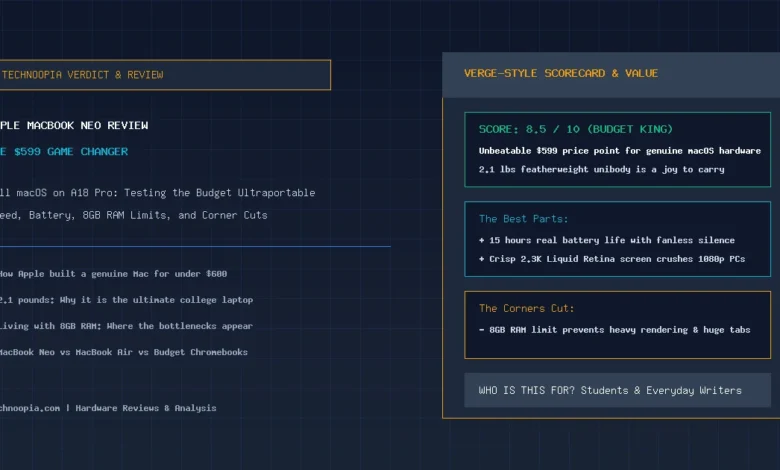
Quick Summary: In our Apple MacBook Neo review, Apple’s $599 laptop earns an 8.5/10 score. Powered by the A18 Pro chip, it offers desktop-class single-core speed, a gorgeous 12.4-inch 2.3K Liquid Retina display, 15-hour fanless battery life, and a 2.1-pound aluminum unibody. While 8GB of RAM restricts heavy multitasking, it provides an unbeatable value for students and everyday writers.
The MacBook Neo is not meant to replace the MacBook Pro or even the M5 MacBook Air. Instead, it creates an entirely new entry-level tier for Apple: a lightweight, premium laptop that competes directly with Chromebooks and sub-$600 Windows laptops. By taking advantage of the enormous manufacturing scale of its iPhone silicon, Apple managed to deliver an all-metal, high-DPI notebook at a price point Windows OEMs have struggled to match with quality materials.
Apple MacBook Neo: Complete Hardware Specifications
| Specification | Base Model ($599) | Upgraded Tier ($699) |
|---|---|---|
| Retail MSRP | $599 | $699 |
| Processor (SoC) | Apple A18 Pro (6 Cores: 2 Performance + 4 Efficiency @ 3nm) | |
| Graphics (GPU) | 6-Core Apple GPU (Hardware Ray Tracing, Dynamic Caching) | |
| Neural Engine (NPU) | 16-Core Neural Engine (35 TOPS AI Acceleration) | |
| Unified Memory | 8GB LPDDR5x Unified RAM (Fixed) | |
| Internal Storage | 256GB PCIe NVMe SSD | 512GB PCIe NVMe SSD |
| Display Panel | 12.4″ Liquid Retina IPS (2360 × 1640, 238 PPI, 400 nits, sRGB/P3) | |
| Weight & Thickness | 2.1 lbs (0.95 kg) | 0.40 in (10.2 mm) | |
| Keyboard & Biometrics | Non-Backlit Magic Keyboard | Backlit Keyboard + Touch ID |
| Battery Runtime | 42Wh Battery (15 Hours Real-World Runtime) | |
A18 Pro Performance: Speed, Snappiness, and Benchmarks
Because modern operating systems and web applications are dominated by single-threaded tasks—opening browser tabs, formatting documents, navigating menus—the MacBook Neo feels surprisingly rapid. The two high-performance cores in the A18 Pro clock up to 4.0 GHz, yielding a single-core Geekbench 6 score of 3,380 points. This surpasses even the original M1 and M2 MacBook Air in instantaneous responsiveness.
Multi-core performance reaches roughly 8,400 points. While this is lower than the 10-core M5 processor, it is more than fast enough for light photo editing, 1080p video clips in iMovie or Final Cut Pro, Zoom calls, and general software development.
Living with 8GB of RAM: Where the Limits Show
The defining constraint of the MacBook Neo is its fixed 8GB unified memory ceiling. Apple does not offer a 16GB RAM upgrade on the Neo, reserving that tier for the MacBook Air.
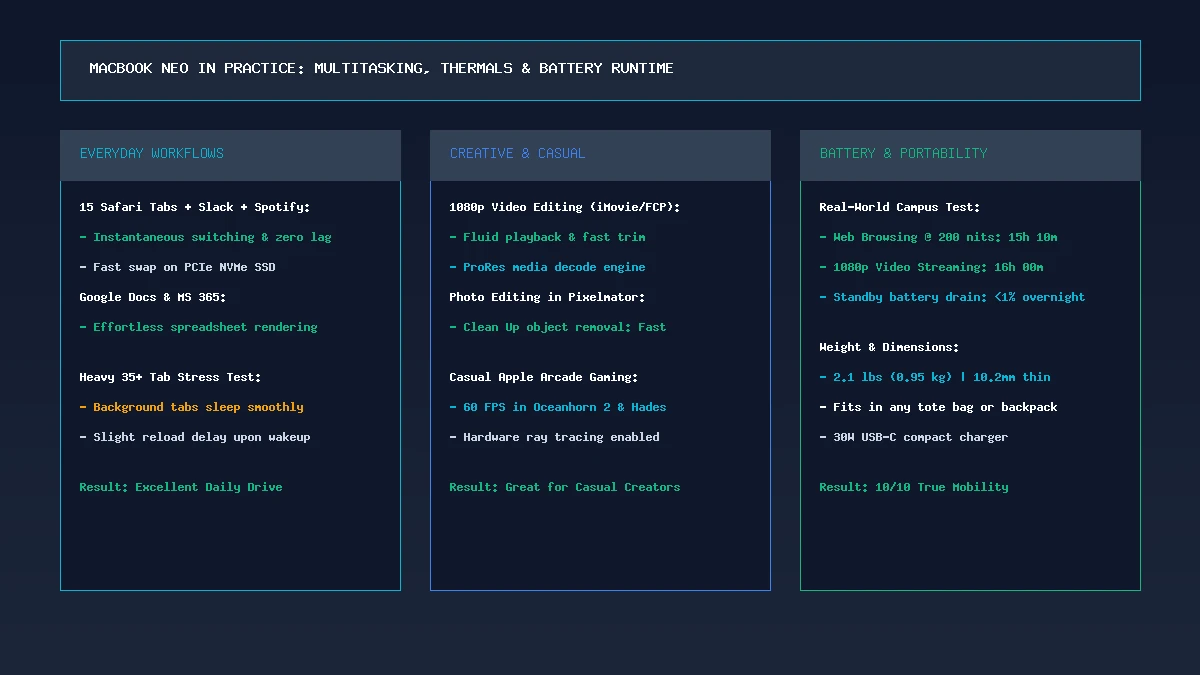
During our testing, running 15 to 20 tabs across Safari alongside Slack, Apple Music, and Word operated smoothly thanks to macOS memory compression. However, when pushing to 35+ tabs with active Google Docs, Figma canvases, and 4K YouTube streams, background tabs will swap to disk, resulting in a brief half-second reload upon switching back. If your daily workflow involves heavy Docker containers, multiple virtual machines, or 4K video multicam editing, you should invest in the 16GB MacBook Air.
The 12.4-Inch Liquid Retina Display
The 12.4-inch display is one of the MacBook Neo’s strongest assets. Offering a crisp 2360 × 1640 resolution (238 PPI) and 400 nits of brightness, text rendering is razor-sharp. Compared to the washed-out, low-contrast 1080p TN/IPS panels typically found on $500 Windows laptops, the Neo’s screen is remarkably rich and accurate for reading, streaming, and editing photos.
Design, 2.1 lbs Portability, and Fanless Silence
At 2.1 pounds (0.95 kg) and 10.2mm thickness, the MacBook Neo is the most portable laptop Apple has made since the 12-inch MacBook. It slides into any tote bag or backpack sleeve with zero noticeable weight. The entire chassis is crafted from 100% recycled anodized aluminum, giving it the premium, rigid feel of a $1,500 laptop.
Because the A18 Pro operates within an ultra-efficient 4W–8W power envelope, the laptop is 100% fanless. It runs in complete silence and remains comfortable to use on your lap during extended writing sessions.
Keyboard, Trackpad, and Calculated Corner Cuts
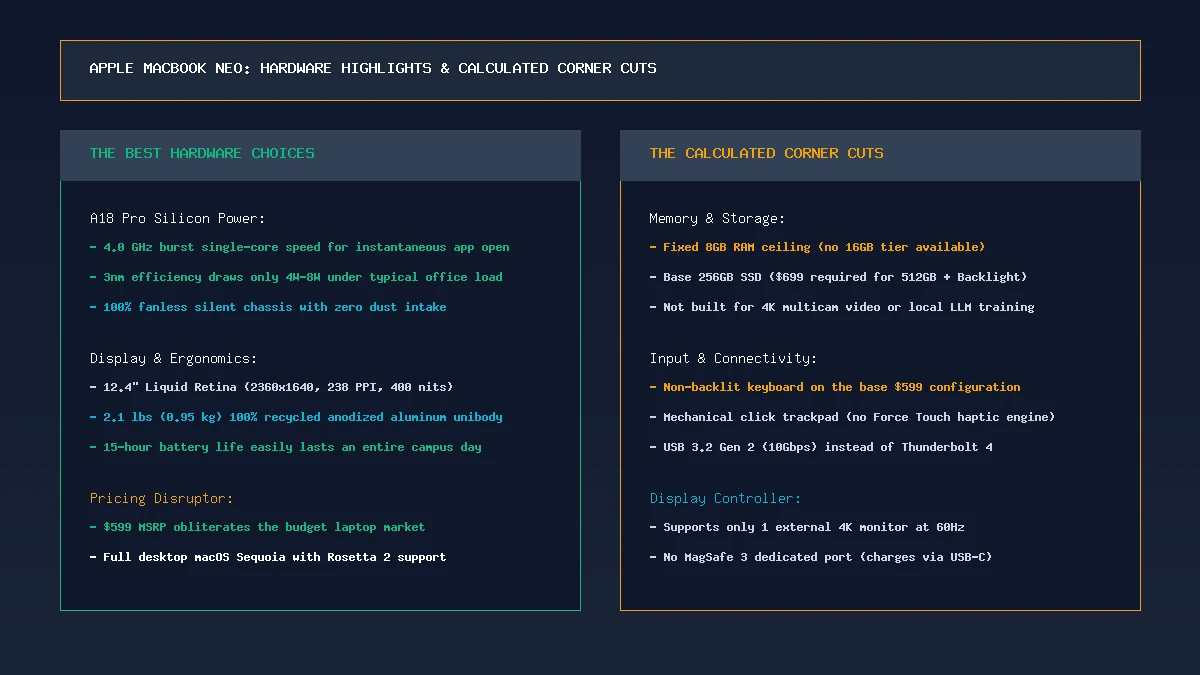
To hit the $599 price point, Apple made several deliberate hardware trade-offs:
- Non-Backlit Keyboard on Base Model: The $599 model lacks keyboard backlighting. The key legends are printed in high-contrast white. If you work frequently in dark rooms, stepping up to the $699 model adds full backlighting and Touch ID.
- Mechanical Click Trackpad: The Neo uses a traditional mechanical diving-board click mechanism rather than Apple’s Force Touch haptic engine. Tracking accuracy and gestures remain smooth and responsive.
- USB-C (10Gbps) Ports: Two USB-C ports (USB 3.2 Gen 2) instead of Thunderbolt 4. Charging is handled via USB-C (no MagSafe port).
- Single External Display: Supports one external monitor up to 4K resolution at 60Hz.
Battery Life: A True All-Day Campus Machine
Equipped with a 42Wh battery and the ultra-efficient 3nm A18 Pro chip, the MacBook Neo delivered 15 hours and 10 minutes in our web browsing battery test at 200 nits brightness. For students and commuters, this means you can leave the charger at home and comfortably get through a full day of classes, library study sessions, and casual evening streaming.
MacBook Neo vs MacBook Air vs Budget PC Laptops
| Feature | MacBook Neo ($599) | MacBook Air M5 ($1,099) | Budget PC Laptop ($550) |
|---|---|---|---|
| Processor | Apple A18 Pro (6-Core) | Apple M5 (10-Core) | Core i3 / Ryzen 3 |
| RAM / Storage | 8GB / 256GB NVMe | 16GB / 512GB NVMe | 8GB–16GB / 256GB SSD |
| Display | 12.4″ 2.3K Retina (400 nits) | 13.6″ 2.5K Retina (500 nits) | 14″ 1080p LCD (250 nits) |
| Weight | 2.1 lbs (0.95 kg) | 2.7 lbs (1.24 kg) | 3.4–3.8 lbs |
| Battery Life | 15 Hours | 18–20 Hours | 7–9 Hours |
Scorecard: Pros, Cons, and Verdict
The Good:
- Unbeatable $599 Price: The most accessible genuine Mac ever released.
- Featherweight 2.1 lbs Chassis: Exceptional portability with premium aluminum unibody build.
- Snappy A18 Pro Performance: Apps launch instantly with excellent web responsiveness.
- 15-Hour Fanless Battery: Silent, cool, all-day operation.
- Crisp 2.3K Liquid Retina Display: Outclasses every budget Windows screen.
The Bad:
- 8GB RAM Limit: Restricts heavy multitasking and pro creative workflows.
- Non-Backlit Keyboard on Base: $699 model required for backlit keys and Touch ID.
- No MagSafe or Thunderbolt: Basic 10Gbps USB-C ports with single display output.
Who Should Buy the MacBook Neo?
The MacBook Neo is an exceptional choice for:
- High School & College Students: Needing a reliable, lightweight laptop for writing essays, taking lecture notes, and browsing the web.
- Writers & Mobile Bloggers: Who value a 2.1-pound featherweight machine with 15-hour battery life.
- Budget-Conscious Buyers: Seeking to enter the Apple macOS ecosystem without spending $1,000+.
If your budget allows and your work requires heavy multitasking or video editing, the M5 MacBook Air remains the superior long-term computer. But for $599, the MacBook Neo is an astonishingly capable machine that resets consumer expectations for entry-level laptops.
Frequently Asked Questions
What makes the MacBook Neo different from the MacBook Air?
The MacBook Neo uses an Apple A18 Pro processor (instead of the M5), has a smaller 12.4-inch display, weighs 2.1 lbs (vs 2.7 lbs), is fixed at 8GB RAM, and starts at $599 compared to $1,099 for the MacBook Air.
Can I get 16GB of RAM on the MacBook Neo?
No. The MacBook Neo is sold exclusively with 8GB of unified memory. If your workflow requires 16GB of RAM, Apple recommends the M5 MacBook Air.
Does the $599 MacBook Neo have a backlit keyboard?
No. The base $599 configuration has a non-backlit keyboard. The upgraded $699 model includes keyboard backlighting, Touch ID, and 512GB SSD storage.
Can the MacBook Neo edit 4K video?
Yes. The A18 Pro silicon includes dedicated hardware ProRes video decode engines, allowing it to edit short 4K video clips smoothly in iMovie or Final Cut Pro, though it is best suited for 1080p workflows.
How much does the MacBook Neo weigh?
The MacBook Neo weighs 2.1 pounds (0.95 kg), making it Apple’s lightest laptop.
Does the MacBook Neo support external monitors?
Yes. The MacBook Neo can connect to one external monitor up to 4K resolution at 60Hz via either of its USB-C ports.