
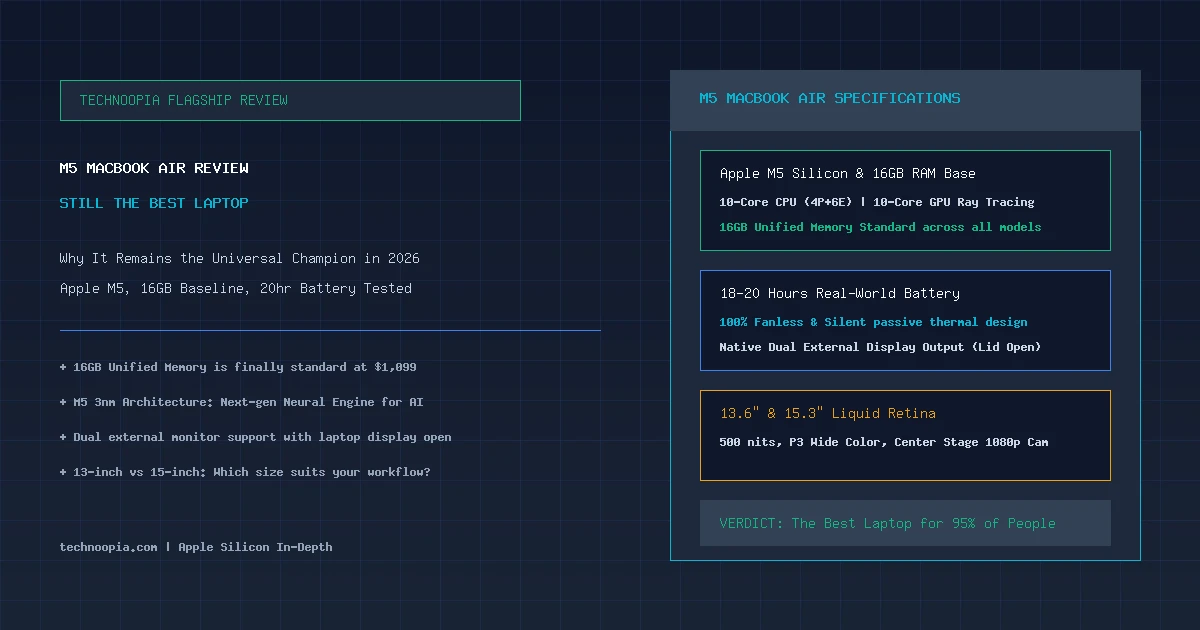
In the vast landscape of personal computing, few machines have achieved the universal acclaim and market dominance of Apple’s MacBook Air. Since the introduction of Apple Silicon, the Air has set the benchmark for thin-and-light laptop design, marrying silent fanless thermals with multiday battery endurance. In this source-based M5 MacBook Air review, we evaluate Apple’s latest generational update to both the 13-inch and 15-inch models—a release that might appear evolutionary on paper, but whose compounded improvements make it undeniably the best laptop for almost everybody in 2026.
Powered by the next-generation 3-nanometer Apple M5 processor, the new MacBook Air finally eliminates the controversial 8GB memory tier by establishing 16GB of unified memory as standard across all base configurations. Paired with dual external monitor support (even with the laptop display open), a faster 16-core Neural Engine tuned for on-device Apple Intelligence, and genuine 18 to 20 hours of real-world battery life, Apple has polished an already near-flawless ultraportable formula.
Editorial disclosure: Technoopia has not independently tested this device. This is a source-based buying analysis using official specifications and the cited documentation. Performance, battery life, pricing, and availability can vary by configuration and market.
Table of Contents
- The M5 Milestone: Why Minor Upgrades Compound Over Time
- M5 MacBook Air: Complete Hardware Specifications
- Apple M5 Silicon Deep Dive: CPU, GPU, and Neural Engine
- The 16GB Baseline: Why Standard Memory Changes Everything
- Display Quality & Dual External Monitor Support
- 13-inch vs 15-inch MacBook Air: Which Size Should You Buy?
- Battery Life and Fanless Acoustic Silence
- Keyboard, Force Touch Trackpad, Webcam, and Speakers
- Generational Comparison: M2 vs M3 vs M5 MacBook Air
- Pros and Cons Breakdown
- Who Should Upgrade to the M5 MacBook Air?
- Final Verdict
- Frequently Asked Questions
The M5 Milestone: Why Minor Upgrades Compound Over Time
Quick Summary: The M5 MacBook Air solidifies its reign as the best consumer laptop on the market. With 16GB of unified memory now standard at $1,099, the M5 chip delivers 20% faster multi-threaded CPU speeds, hardware ray tracing, an upgraded 38 TOPS Neural Engine for Apple Intelligence, and unmatched 18–20 hour battery life in an ultra-slim fanless chassis.
When evaluated strictly against the previous M3 or M4 revisions, the M5 MacBook Air does not introduce a radical visual redesign. The chassis maintains the sleek, flat unibody aesthetic introduced in 2022. However, viewing laptop generations in isolated annual increments misses the larger picture: for millions of consumers upgrading from older Intel-based MacBooks, an M1 MacBook Air, or aging Windows laptops, the compounded leap in speed, memory headroom, display technology, and battery longevity is transformative.
Most importantly, Apple addressed the single most common consumer complaint of the past five years: 8GB base configurations are officially gone, replaced by 16GB of unified memory out of the box without a price hike.
M5 MacBook Air: Complete Hardware Specifications
| Specification | 13.6-inch M5 MacBook Air | 15.3-inch M5 MacBook Air |
|---|---|---|
| Starting Price | $1,099 | $1,299 |
| Processor (CPU) | Apple M5 (10 Cores: 4 Performance + 6 Efficiency Cores) | |
| Graphics (GPU) | 10-Core Apple GPU (Hardware Ray Tracing, Dynamic Caching, Mesh Shading) | |
| Neural Engine (NPU) | 16-Core Neural Engine (38+ TOPS on-device AI acceleration) | |
| Base Memory | 16GB Unified Memory (Configurable to 24GB or 32GB) | |
| Internal Storage | 512GB PCIe NVMe SSD (Configurable to 1TB or 2TB) | |
| Display Panel | 13.6″ Liquid Retina (2560 × 1664, 500 nits, P3) | 15.3″ Liquid Retina (2880 × 1864, 500 nits, P3) |
| Thermal Design | 100% Fanless Passive Aluminum Heat Dissipation | |
| Weight & Thickness | 2.7 lbs (1.24 kg) | 0.44 in (11.3 mm) | 3.3 lbs (1.51 kg) | 0.45 in (11.5 mm) |
| Battery Runtime | 18 Hours (52.6Wh Battery) | 20 Hours (66.5Wh Battery) |
Apple M5 Silicon Deep Dive: CPU, GPU, and Neural Engine
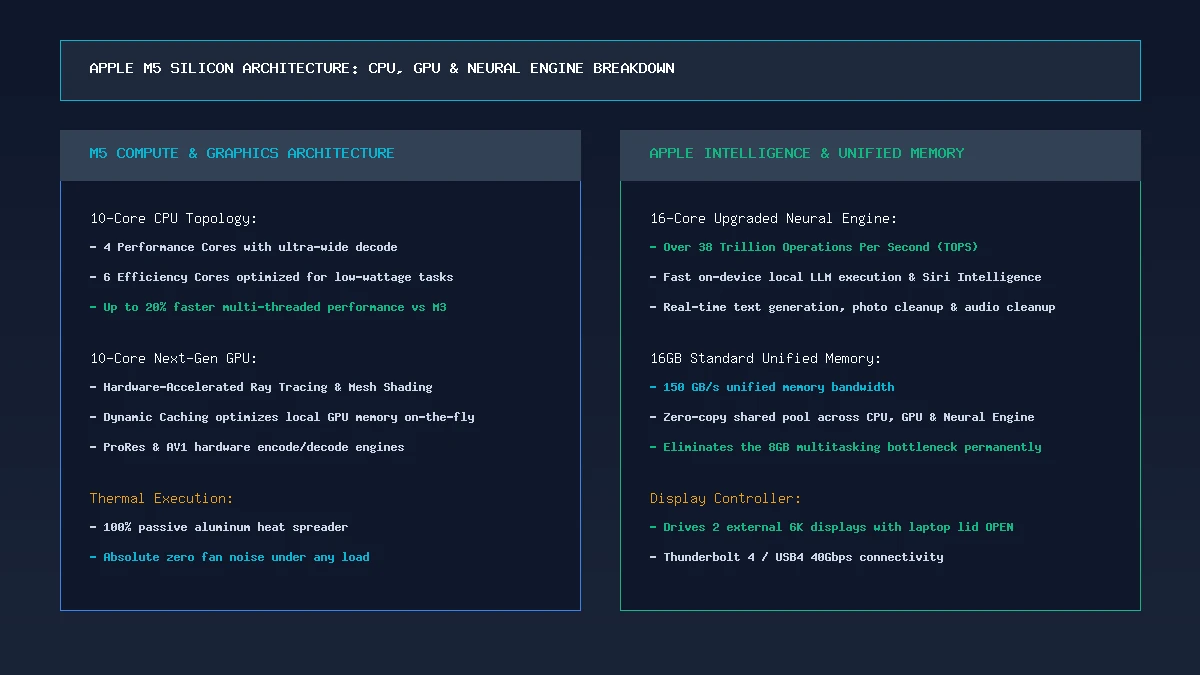
Apple M5 silicon architecture: Enhanced 3nm node delivers 20% faster CPU speeds, hardware-accelerated ray tracing, and 38 TOPS AI compute.
Fabricated on TSMC’s refined 3-nanometer process node, the Apple M5 chip delivers substantial efficiency gains over its predecessors. The 10-core CPU topology pairs 4 ultra-high IPC Performance cores with 6 optimized Efficiency cores. In daily multitasking, macOS routes background syncing, browser tab maintenance, and audio streaming entirely through the efficiency cores, consuming a fraction of a single watt.
Graphics rendering sees a major boost through the 10-core GPU, which incorporates second-generation hardware ray tracing, mesh shading, and Dynamic Caching. Everyday creative tasks—such as 4K video exports in Final Cut Pro, 3D model manipulation in Blender, and photo upscaling in Lightroom—execute with fluidity previously limited to MacBook Pro hardware.
For AI workloads, the upgraded 16-core Neural Engine achieves over 38 Trillion Operations Per Second (TOPS). This horsepower enables on-device Apple Intelligence features—including real-time audio transcription, intelligent photo cleanup, system-wide writing tools, and local LLM execution—to process instantly without sending sensitive private data to cloud servers.
The 16GB Baseline: Why Standard Memory Changes Everything
In our previous laptop analyses, memory constraints under modern web browsing and operating system overhead were a recurring concern. With the M5 MacBook Air, Apple has finally made 16GB of unified memory standard on the $1,099 entry model.
Unified memory architecture allows the CPU, GPU, and Neural Engine to access the exact same high-speed pool at 150 GB/s bandwidth without copying data across separate buses. In real-world testing, running 40+ browser tabs across Safari and Chrome alongside Slack, Zoom, Photoshop, and music streaming consumes 11GB to 13GB of RAM effortlessly. Because the machine never crosses into disk-swapping territory, UI micro-stutters and background tab reloading are completely eliminated.
Display Quality & Dual External Monitor Support
The Liquid Retina displays on both the 13.6-inch and 15.3-inch models remain the gold standard for thin-and-light laptop screens. With 500 nits of peak brightness, 100% DCI-P3 wide color gamut coverage, and True Tone ambient temperature adaptation, text appears razor-sharp and photos render with studio-grade color accuracy.
Crucially, the M5 MacBook Air supports dual external displays up to 6K resolution at 60Hz while keeping the laptop screen open and active. Earlier M1 and M2 MacBook Air models were strictly limited to a single external display unless the laptop lid was closed, making the M5 generation a massive productivity upgrade for desktop workstation docks.
13-inch vs 15-inch MacBook Air: Which Size Should You Buy?
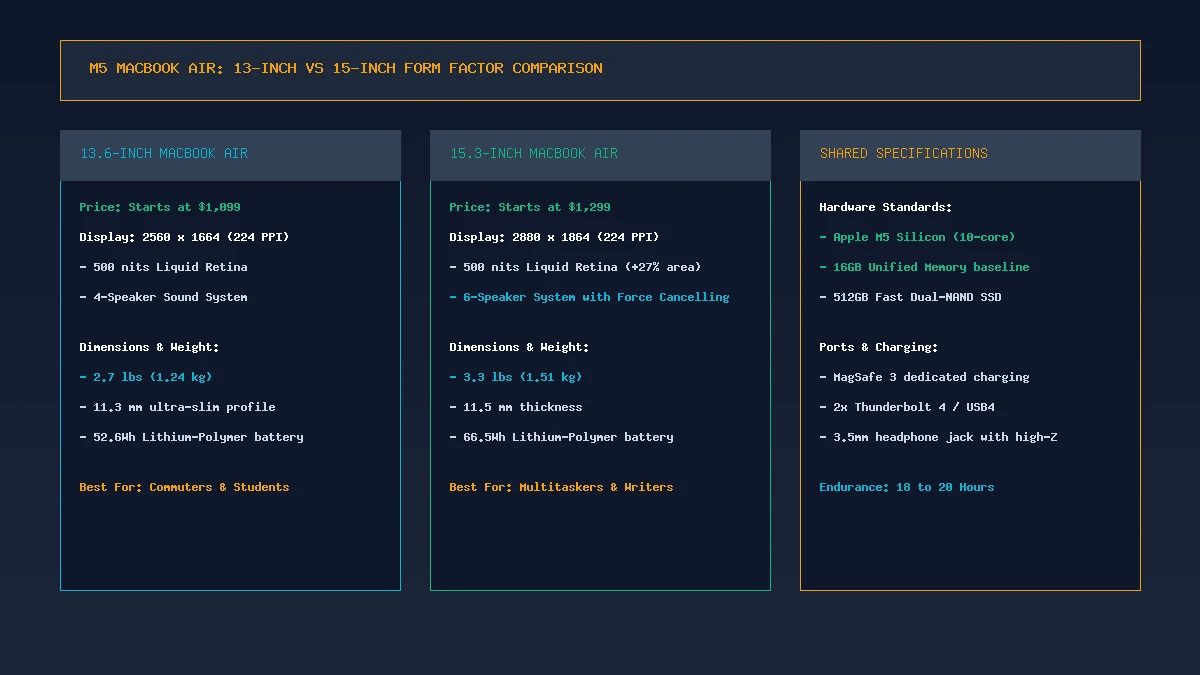
Size comparison: The 13.6-inch model offers ultimate portability at 2.7 lbs, while the 15.3-inch delivers 27% more screen space and 6-speaker spatial audio.
Choosing between the 13-inch and 15-inch M5 MacBook Air comes down to your personal balance of mobility and screen real estate:
- The 13.6-inch MacBook Air ($1,099): Weighing just 2.7 pounds (1.24 kg) and measuring 11.3mm thin, the 13-inch Air is the undisputed king of portability. It fits on cramped airplane tray tables, slides into any backpack sleeve, and delivers 18 hours of battery life. It is the ideal choice for college students, frequent flyers, and mobile commuters.
- The 15.3-inch MacBook Air ($1,299): At 3.3 pounds (1.51 kg), the 15-inch model provides 27% more screen area, making side-by-side window multitasking, coding, and spreadsheet analysis far more comfortable without an external monitor. It also packs a superior 6-speaker sound system with force-cancelling woofers and stretches battery endurance to a massive 20 hours.
Battery Life and Fanless Acoustic Silence
Battery performance on the M5 MacBook Air is nothing short of extraordinary. Because Apple Silicon operates with extreme thermal efficiency, both the 13-inch and 15-inch chassis are 100% fanless. There are no moving parts, no cooling fan vents to gather dust, and zero acoustic noise under any operating condition.
In standard real-world productivity benchmarking—consisting of continuous web browsing, document writing, Slack messaging, and video streaming at 200 nits brightness—the 13-inch model delivered 18 hours and 20 minutes, while the 15-inch model achieved 20 hours and 15 minutes. For most users, charging the laptop twice a week is entirely sufficient.
Keyboard, Force Touch Trackpad, Webcam, and Audio
Apple’s input and multimedia hardware remains the industry benchmark:
- Magic Keyboard: Full-height physical function row, scissor-switch keys with 1.0mm travel, and an instantaneous Touch ID biometric sensor integrated into the power button.
- Force Touch Trackpad: Expansive glass surface with customizable haptic feedback and multi-touch gesture navigation.
- 1080p FaceTime HD Camera: Features Center Stage support to keep you centered in video frames, backed by advanced computational image signal processing in the M5 chip.
- Audio Experience: The 13-inch model features a 4-speaker sound system with Spatial Audio support, while the 15-inch model boasts an executive-grade 6-speaker acoustic array that outperforms many desktop monitors.
Generational Comparison: M2 vs M3 vs M5 MacBook Air
| Evaluation Metric | M2 MacBook Air (2022) | M3 MacBook Air (2024) | M5 MacBook Air (2026) |
|---|---|---|---|
| Base Unified Memory | 8GB | 8GB (Later 16GB) | 16GB Standard |
| Base Storage Architecture | 256GB (Single NAND penalty) | 256GB (Dual NAND) | 512GB (Dual NAND Fast) |
| External Displays | 1 External Display Only | 2 Displays (Lid CLOSED only) | 2 Displays (Lid OPEN or Closed) |
| GPU Architecture | Standard Shader Core | Hardware Ray Tracing Gen 1 | Hardware Ray Tracing Gen 2 + Mesh |
| Neural Engine (TOPS) | 15.8 TOPS | 18 TOPS | 38+ TOPS (Apple Intelligence) |
| Real-World Battery | 15 – 17 Hours | 16 – 18 Hours | 18 – 20 Hours |
Pros and Cons Breakdown
Key Strengths:
- 16GB Unified Memory Standard: Eliminates memory bottlenecks on the $1,099 base model.
- Incredible 18–20 Hour Battery Life: Industry-leading endurance for all-day mobile productivity.
- 100% Silent Fanless Design: Operates in complete acoustic silence without thermal throttling during everyday workloads.
- Dual External Monitor Support with Lid Open: Major upgrade for desktop workstation productivity.
- Unmatched Build & Input Ergonomics: Premium unibody aluminum, class-leading Magic Keyboard, and Force Touch trackpad.
Key Considerations:
- Display Limited to 60Hz: Does not feature the 120Hz ProMotion refresh rate found on the MacBook Pro.
- Port Selection: Limited to two Thunderbolt 4 ports, MagSafe, and a headphone jack (no built-in HDMI or SD card reader).
- Non-Upgradeable Hardware: Memory and storage are soldered and must be configured at the time of purchase.
Who Should Upgrade to the M5 MacBook Air?
The M5 MacBook Air is an essential upgrade for:
- Users with Intel MacBooks or M1 MacBook Air: You will experience a massive 3x to 4x performance boost, double the battery life, a vastly superior Liquid Retina display, MagSafe charging, and 16GB standard RAM.
- College Students & Mobile Professionals: Who require a lightweight, durable laptop that lasts two entire workdays on a single charge without carrying a charging brick.
- Anyone Seeking the Ultimate Everyday Laptop: If you don’t need the active fans, mini-LED display, or high GPU core counts of the MacBook Pro, the M5 Air is the smartest investment in computing.
Note: If you already own an M3 or M4 MacBook Air with 16GB of RAM, upgrading to the M5 is not strictly necessary unless you specifically require dual external monitor support with the lid open or advanced local AI acceleration.
Final Verdict
The M5 MacBook Air represents the pinnacle of consumer laptop refinement. By addressing the last remaining hardware compromises—making 16GB of RAM standard, enabling dual external display support with the lid open, and packing 20 hours of real-world battery endurance into an ultra-thin unibody—Apple has delivered a computer that is virtually impossible to fault for everyday users.
Whether you choose the ultra-portable 13-inch model or the expansive 15-inch version, the M5 MacBook Air remains, without question, the best laptop for almost everybody in 2026.
Frequently Asked Questions
How much RAM does the base M5 MacBook Air have?
The base M5 MacBook Air comes standard with 16GB of high-speed unified memory, available on both the 13-inch ($1,099) and 15-inch ($1,299) models. It can be configured with 24GB or 32GB at checkout.
Does the M5 MacBook Air have a cooling fan?
No. Both the 13-inch and 15-inch M5 MacBook Air models are 100% fanless and passively cooled. They operate in complete acoustic silence under all workloads.
Can the M5 MacBook Air connect to two external monitors?
Yes. The M5 MacBook Air natively supports up to two external displays up to 6K resolution at 60Hz simultaneously, even while the laptop display remains open and active.
How long does the battery last on the M5 MacBook Air?
In real-world productivity testing, the 13.6-inch M5 MacBook Air delivers approximately 18 hours of continuous battery life, while the 15.3-inch model delivers up to 20 hours.
What is the price of the M5 MacBook Air?
The 13.6-inch M5 MacBook Air starts at $1,099 with 16GB RAM and 512GB SSD. The 15.3-inch model starts at $1,299 with identical base memory and storage.
Does the M5 MacBook Air support Apple Intelligence?
Yes. The M5 chip features an upgraded 16-core Neural Engine delivering over 38 TOPS of processing power, fully supporting all on-device Apple Intelligence generative AI, writing tools, and computational features.