
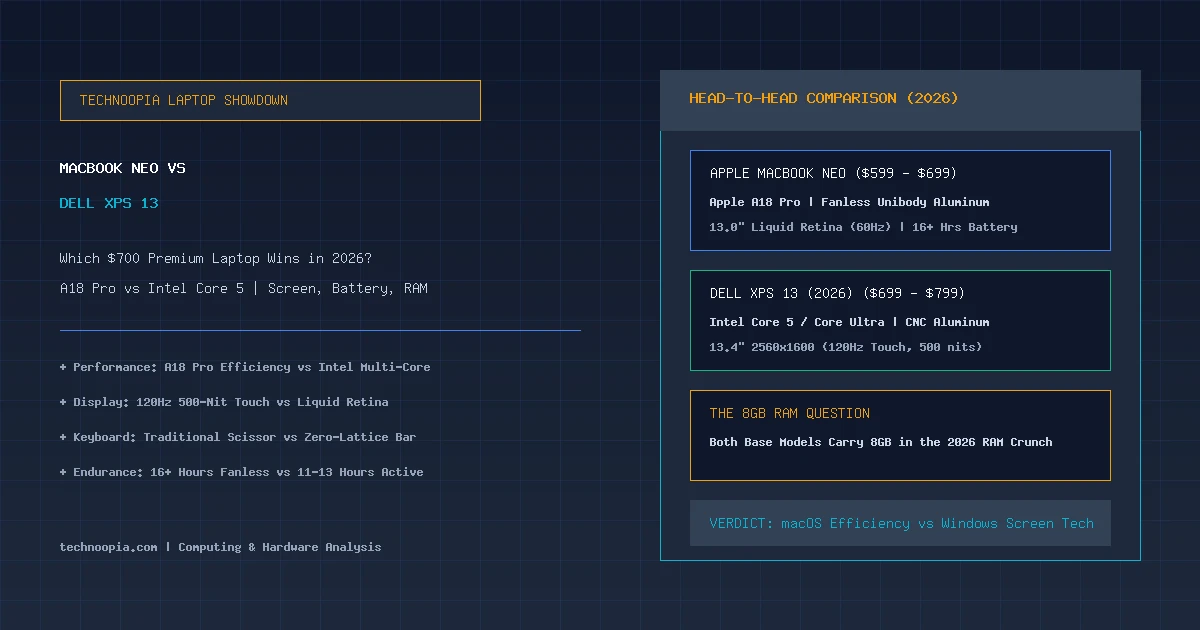
The sub-$800 laptop category has reached an unprecedented crossroads in 2026. For years, shoppers seeking premium aluminum craftsmanship, razor-thin bezels, and all-day battery life were forced to spend upwards of $1,000. Today, the MacBook Neo vs Dell XPS 13 showdown represents the fiercest clash in accessible luxury computing. Apple has fundamentally disrupted entry pricing with its $599 to $699 MacBook Neo, while Dell has aggressively positioned an entry-level XPS 13 configuration to defend the Windows ultraportable crown.
Yet both machines arrive with an identical, fiercely debated compromise: a base configuration equipped with only 8GB of RAM. Amidst the global memory price surge known as RAMageddon, how do these two design-forward ultraportables perform when pushed through real-world daily multitasking? This deeply researched comparison examines silicon performance, display quality, typing ergonomics, thermal behavior, battery endurance, and long-term operating system efficiency to help you determine which $700 laptop deserves your investment.
Editorial disclosure: Technoopia has not independently tested this device. This is a source-based buying analysis using official specifications and the cited documentation. Performance, battery life, pricing, and availability can vary by configuration and market.
Table of Contents
- The $700 Premium Laptop Revolution in 2026
- MacBook Neo vs Dell XPS 13: Hardware Specifications
- Design, Build Quality, and Portability
- Display Showdown: 60Hz Liquid Retina vs 120Hz QHD+ Touch
- Keyboard, Trackpad, and the Capacitive Touch Bar Dilemma
- Performance: Apple A18 Pro vs Intel Core 5
- The 8GB RAM Reality: macOS Memory Compression vs Windows 11
- Battery Life, Thermals, and Fan Noise
- Port Selection and Everyday Connectivity
- MacBook Neo vs Dell XPS 13: Direct Feature Comparison
- Pros and Cons Breakdown
- The Verdict: Which Laptop Should You Buy?
- Frequently Asked Questions
The $700 Premium Laptop Revolution in 2026
Quick Summary: In the MacBook Neo vs Dell XPS 13 matchup, the MacBook Neo ($599–$699) wins on battery life (16+ hours), fanless silence, and smoother 8GB memory compression via the A18 Pro chip. The Dell XPS 13 ($699–$799) wins on display technology with a brighter 120Hz touch screen, higher resolution, and native Windows software versatility.
Until recently, buying a laptop under $700 meant accepting plastic chassis creaks, dim 250-nit screens, and mediocre trackpads. That paradigm shattered when Apple adapted its high-performance A-series silicon into the MacBook Neo, delivering an all-aluminum unibody enclosure with class-leading battery efficiency at a starting price previously reserved for budget iPads.
In response, Dell revamped its entry-level XPS 13 tier. Rather than relegating budget buyers to lower-tier Inspiron models, Dell packaged its flagship CNC aluminum chassis and InfinityEdge display tech into an accessible price bracket. However, because both machines sit squarely in the crosshairs of 2026’s memory pricing crisis, buyers must weigh whether an 8GB baseline machine can legitimately meet their multi-year computing demands.
MacBook Neo vs Dell XPS 13: Hardware Specifications
| Specification | Apple MacBook Neo (2026) | Dell XPS 13 (2026 Entry Tier) |
|---|---|---|
| Starting Price | $599 – $699 | $699 – $799 |
| Processor (CPU) | Apple A18 Pro (6-Core CPU: 2 Performance + 4 Efficiency) | Intel Core 5 120U / Core Ultra 5 (10-Core Hybrid) |
| Graphics (GPU) | 6-Core Apple GPU (Hardware Ray Tracing) | Intel Graphics (4 Xe-Cores) |
| Base Memory (RAM) | 8GB Unified LPDDR5x (16GB optional on higher tiers) | 8GB LPDDR5x (Soldered; 16GB optional) |
| Base Storage | 256GB PCIe NVMe SSD | 256GB / 512GB PCIe Gen4 SSD |
| Display Panel | 13.0″ Liquid Retina IPS (2408 × 1506, 60Hz, 500 nits, P3) | 13.4″ InfinityEdge IPS (2560 × 1600, 120Hz VRR, 500 nits, Touch) |
| Thermal Design | 100% Fanless & Passive | Dual-Fan Active Cooling |
| Weight & Dimensions | 2.7 lbs (1.22 kg) | 0.44 in (11.2 mm) thick | 2.6 lbs (1.18 kg) | 0.58 in (14.8 mm) thick |
| Battery Runtime | 16 to 18 Hours (Real-World Mixed Use) | 10 to 12 Hours (120Hz) / 13 Hours (60Hz) |
Design, Build Quality, and Portability
Both laptops deliver build quality that completely outclasses standard entry-level notebooks. Apple’s MacBook Neo utilizes a refined version of the MacBook Air chassis—machined from 100% recycled aluminum with zero panel gaps, clean chamfered edges, and a sturdy hinge that opens effortlessly with one finger.
The Dell XPS 13 counters with a breathtaking minimalist design language. Carved from CNC-machined aluminum with tone-on-tone glass palm rests, the XPS 13 feels like a futuristic sculpture. In terms of physical footprint, the XPS 13 is slightly more compact due to Dell’s razor-thin four-sided InfinityEdge bezels, giving it a 92% screen-to-body ratio compared to Apple’s 84%.
Weight is nearly identical: the XPS 13 tips the scales at 2.6 pounds (1.18 kg), while the MacBook Neo weighs 2.7 pounds (1.22 kg). Both are marvelously portable and fit into slim bags without adding noticeable bulk.
Display Showdown: 60Hz Liquid Retina vs 120Hz QHD+ Touch
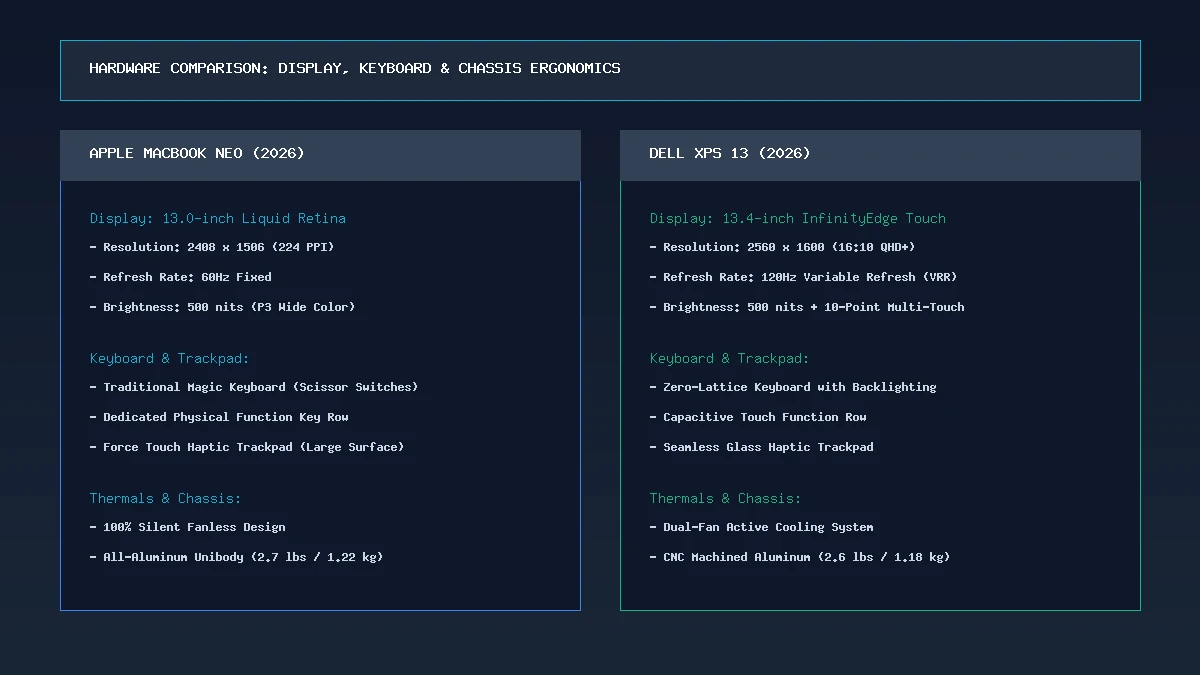
Display and ergonomics comparison: Dell’s 120Hz touch screen excels in fluidity, while Apple offers superior physical keyboard ergonomics.
When comparing screens in the MacBook Neo vs Dell XPS 13 evaluation, Dell scores a decisive technical victory. The XPS 13 features a stunning 13.4-inch 16:10 display boasting a crisp 2560 × 1600 resolution and a fluid 120Hz variable refresh rate. Animations, document scrolling, and window management feel exceptionally smooth, and the panel includes 10-point capacitive touch support.
Apple’s MacBook Neo features a 13.0-inch Liquid Retina panel running at 2408 × 1506 resolution. While it matches Dell’s 500 nits of peak brightness and provides flawless 100% DCI-P3 wide color gamut reproduction, it remains locked at a standard 60Hz refresh rate and lacks touchscreen functionality.
For users who prioritize high-refresh-rate fluidity and interactive touchscreen capability, the Dell XPS 13 offers a vastly superior visual experience in this price class.
Keyboard, Trackpad, and the Capacitive Touch Bar Dilemma
While Dell wins the display category, Apple takes a commanding lead in typing and input ergonomics. The MacBook Neo retains Apple’s industry-standard Magic Keyboard, featuring physical scissor-switch keys with satisfying tactile travel, dedicated full-height function keys, and a rock-solid Force Touch trackpad that simulates physical clicks across 100% of its glass surface.
The Dell XPS 13 incorporates controversial design choices that divide user opinion:
- Zero-Lattice Keyboard: The keycaps are completely flush against one another with no physical spacing between them. While keys are backlit and snappy, touch-typists report an adjustment period with higher initial error rates.
- Capacitive Function Row: Dell replaced physical Escape and Function keys with a capacitive LED touch strip. Without tactile feedback, blind-pressing media controls or Esc during coding requires visual confirmation.
- Invisible Seamless Haptic Trackpad: The glass wrist rest is completely flat with no visual or tactile borders demarcating where the trackpad starts or ends, which can lead to missed clicks until muscle memory develops.
For writers, coders, and students who type thousands of words daily, the MacBook Neo provides a dramatically more reliable and comfortable typing environment.
Performance: Apple A18 Pro vs Intel Core 5
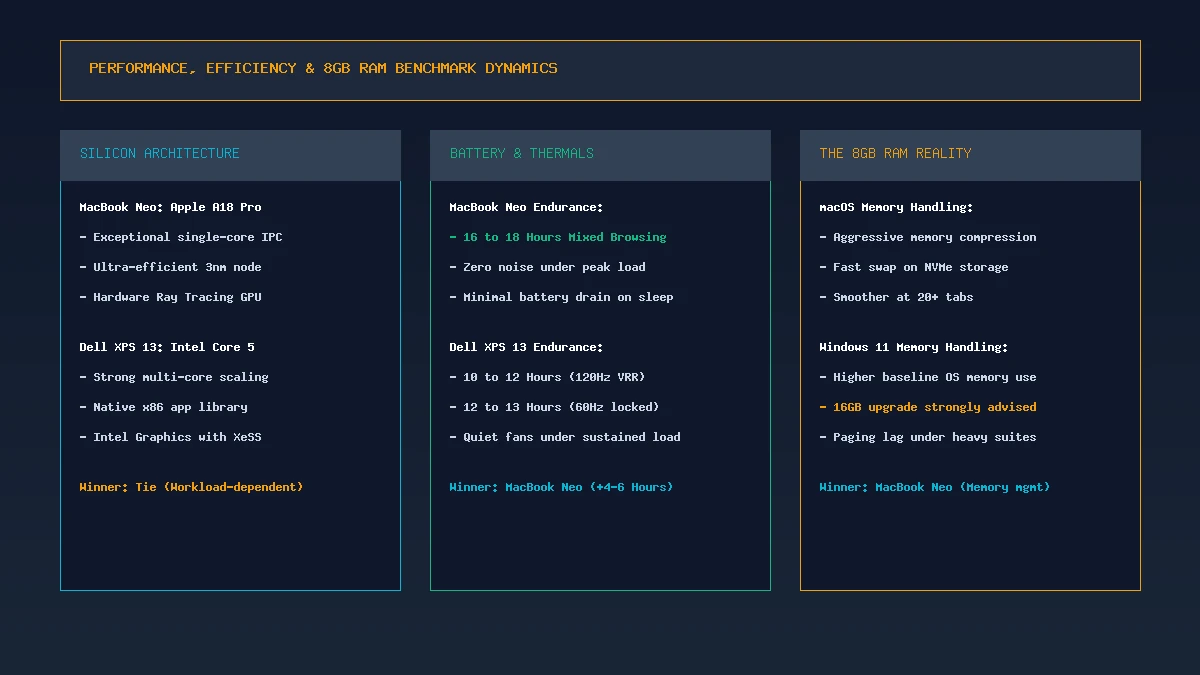
Performance and memory handling: Apple’s A18 Pro delivers superior battery runtime and memory compression, while Intel offers broad x86 compatibility.
Under the hood, these machines approach computing from diametrically opposed silicon philosophies. Apple equipped the MacBook Neo with its A18 Pro chip—the same 3-nanometer architecture developed for flagship mobile devices. Paired with macOS, this processor delivers staggering single-core performance that rivals desktop processors in everyday responsiveness.
The Dell XPS 13 relies on Intel’s Core 5 architecture, utilizing a hybrid configuration of performance and efficiency cores. While Intel trades blows with Apple in sustained multi-threaded rendering and offers 100% native x86 legacy software compatibility, it draws substantially more wattage under load.
In web browsing, Office 365, Slack communication, and 4K media playback, both laptops feel instantaneous. However, Apple’s hardware video decode engines and dedicated Neural Engine enable the Neo to process light video edits and local AI tasks without generating heat or consuming excess power.
The 8GB RAM Reality: macOS Memory Compression vs Windows 11
The defining controversy in the MacBook Neo vs Dell XPS 13 comparison is the 8GB base RAM limitation. In 2026, operating systems and modern Chromium browsers are notoriously memory-hungry, but the two platforms manage restricted memory very differently.
Apple’s Unified Memory & Fast Compression
macOS utilizes advanced memory compression algorithms. When memory pressure rises on the MacBook Neo, macOS compresses inactive memory pages in real-time. If physical memory is exceeded, the ultra-fast NVMe solid-state drive handles virtual memory paging with minimal perceptible slowdown during casual 25-tab browsing sessions.
Windows 11 and Background Service Overhead
Windows 11 carries a heavier baseline memory footprint. Out of the box, Windows services, security modules, and background telemetry consume 4GB to 4.5GB of RAM. Consequently, when an XPS 13 user opens 20 Chrome tabs, a spreadsheet, and a Teams meeting, the machine enters aggressive disk paging. While the XPS 13 remains usable, power users will notice subtle interface hitches and tab-reloading delays that do not occur on the Neo.
Takeaway: If you cannot afford to upgrade to 16GB of RAM, an 8GB MacBook Neo feels substantially more forgiving in daily multitasking than an 8GB Windows laptop.
Battery Life, Thermals, and Fan Noise
Thermal engineering is another area where the MacBook Neo establishes clear dominance. Because the A18 Pro operates with extreme energy efficiency, the MacBook Neo is completely fanless. It operates in absolute silence 100% of the time, generating virtually no heat during web browsing, document writing, or Zoom calls.
Battery life depends on display brightness, applications, wireless activity, and the exact configuration. The battery capacity and power-efficient processor support all-day-use ambitions, but buyers should compare independent testing for the model sold in their market.
The Dell XPS 13 incorporates dual active cooling fans. While the fans remain quiet during light typing, they spool up during software updates or intensive video playback. Battery life on the XPS 13 averages 10 to 12 hours when utilizing the dynamic 120Hz display mode, extending to around 13 hours if locked at 60Hz. While respectable for a Windows machine, it cannot match Apple’s mobile-derived endurance.
Port Selection and Everyday Connectivity
Both ultraportables prioritize minimalist aesthetics over legacy port variety, meaning dongles remain part of the ownership experience for legacy USB-A drives:
- MacBook Neo: 2× USB-C (USB4 / Thunderbolt 3, DisplayPort, Charging) and 1× 3.5mm headphone jack. Includes Apple MagSafe 3 charging on select regional models or standard USB-C fast charging.
- Dell XPS 13: 2× Thunderbolt 4 (USB-C, DisplayPort 2.1, Power Delivery). No 3.5mm headphone jack (Dell includes a USB-C to 3.5mm adapter in the box).
Dell deserves credit for equipping both ports with full Thunderbolt 4 speeds (40Gbps), whereas Apple retains the headphone jack that many audio enthusiasts and students rely on.
MacBook Neo vs Dell XPS 13: Direct Feature Comparison
| Evaluation Metric | Apple MacBook Neo | Dell XPS 13 (2026) | Category Winner |
|---|---|---|---|
| Display Fluidity & Touch | 60Hz Non-Touch (2408 × 1506) | 120Hz VRR Multi-Touch (2560 × 1600) | Dell XPS 13 |
| Typing & Trackpad | Magic Keyboard + Physical Function Row | Zero-Lattice + Capacitive Touch Bar | MacBook Neo |
| Battery Runtime | 16 – 18 Hours (Real-World) | 10 – 12 Hours (120Hz) | MacBook Neo |
| Acoustics & Thermals | 100% Silent Fanless Design | Dual Active Fans (Quiet to Audible) | MacBook Neo |
| 8GB RAM Handling | High-efficiency macOS compression | Higher Windows 11 background overhead | MacBook Neo |
| Starting Price / Value | ~$599 – $699 | ~$699 – $799 | MacBook Neo |
Pros and Cons Breakdown
Apple MacBook Neo:
- Pros: Exceptional $599–$699 entry price; 16+ hour battery life; 100% silent fanless design; superior physical keyboard and trackpad; seamless macOS ecosystem integration.
- Cons: Display limited to 60Hz with no touch support; 8GB base memory cannot be upgraded post-purchase; port selection limited to two USB-C connectors.
Dell XPS 13 (2026):
- Pros: Gorgeous 13.4″ 120Hz touch screen with ultra-slim InfinityEdge bezels; dual full-speed Thunderbolt 4 ports; premium CNC aluminum build; native Windows 11 software library.
- Cons: Capacitive touch function row and zero-lattice keyboard divide users; 8GB base RAM struggles under heavy Windows multitasking; shorter battery life than the Neo.
The Verdict: Which Laptop Should You Buy?
In the direct MacBook Neo vs Dell XPS 13 showdown, the **Apple MacBook Neo emerges as the superior overall purchase for most budget-conscious buyers** seeking a sub-$700 ultraportable.
By pairing its smartphone-derived 3nm A18 Pro architecture with an all-aluminum enclosure, Apple created a machine that excels in the areas everyday users value most: silent fanless operation, comfortable physical typing ergonomics, class-leading 16+ hour battery life, and superior memory compression that makes 8GB of RAM feel surprisingly usable.
However, the **Dell XPS 13 remains a compelling alternative** for dedicated Windows users who prioritize visual excellence. If your daily workflow benefits from a fluid 120Hz high-refresh-rate touch display, edge-to-edge bezels, and full Thunderbolt 4 connectivity, the XPS 13 is one of the most stunning compact PCs on the market—provided you consider stretching your budget to the 16GB RAM model for long-term peace of mind.
Frequently Asked Questions
Which is cheaper: MacBook Neo or Dell XPS 13?
The Apple MacBook Neo is generally cheaper, starting between $599 and $699 depending on sales and storage configuration. The entry-level Dell XPS 13 typically retails between $699 and $799.
Is 8GB of RAM enough on the MacBook Neo and Dell XPS 13 in 2026?
For students, writers, office administrators, and casual web multitaskers with 15 to 25 open tabs, 8GB of RAM is sufficient. However, macOS handles 8GB more gracefully through memory compression than Windows 11. Power users handling heavy 4K video editing, large programming builds, or massive databases should configure 16GB.
Does the MacBook Neo have a fan?
No. The MacBook Neo is 100% fanless and passively cooled. It produces zero fan noise regardless of workload.
Does the Dell XPS 13 have a touchscreen?
Yes. The base Dell XPS 13 display includes a 13.4-inch 120Hz InfinityEdge touchscreen with 2560 x 1600 resolution. The MacBook Neo does not support touch input.
Which laptop has better battery life?
The MacBook Neo offers significantly better battery life, delivering 16 to 18 hours of real-world mixed productivity. The Dell XPS 13 averages 10 to 12 hours with its 120Hz screen enabled.
Can the RAM or SSD be upgraded on either laptop?
On both the MacBook Neo and Dell XPS 13, the LPDDR5x RAM is soldered directly to the motherboard and cannot be upgraded after purchase. The SSD on the MacBook Neo is non-upgradeable, while the XPS 13 uses a standard M.2 NVMe slot on select configurations.